
 Blog
Blog
Developing sphinx-fediverse
2025-03-24
A few months ago, I had an idea. What if I could use the Fediverse to embed comments in my sphinx-generated pages?
It turned out I wasn’t the first to think of this. Many others have used this kind of thing to power the comments of their blogs [Hal, knz, Maca, Macb, Pec, Scha, Schb, Sco, Win]. Enough so that it was easy to find references on how to implement it.
The main difficulty was the way I wanted to go about it. I wanted it to be a sphinx plugin, and I wanted it to be both flexible and configurable. This post covers the challenges I encountered.
The Starting Point
Initially, I just wanted to get a proof of concept working. I took heavy inspiration from [Macb] in my first draft. It’s where I first saw the workflow for how to do this, and while I made a lot of changes, the main workflow is still largely inspired by that post.
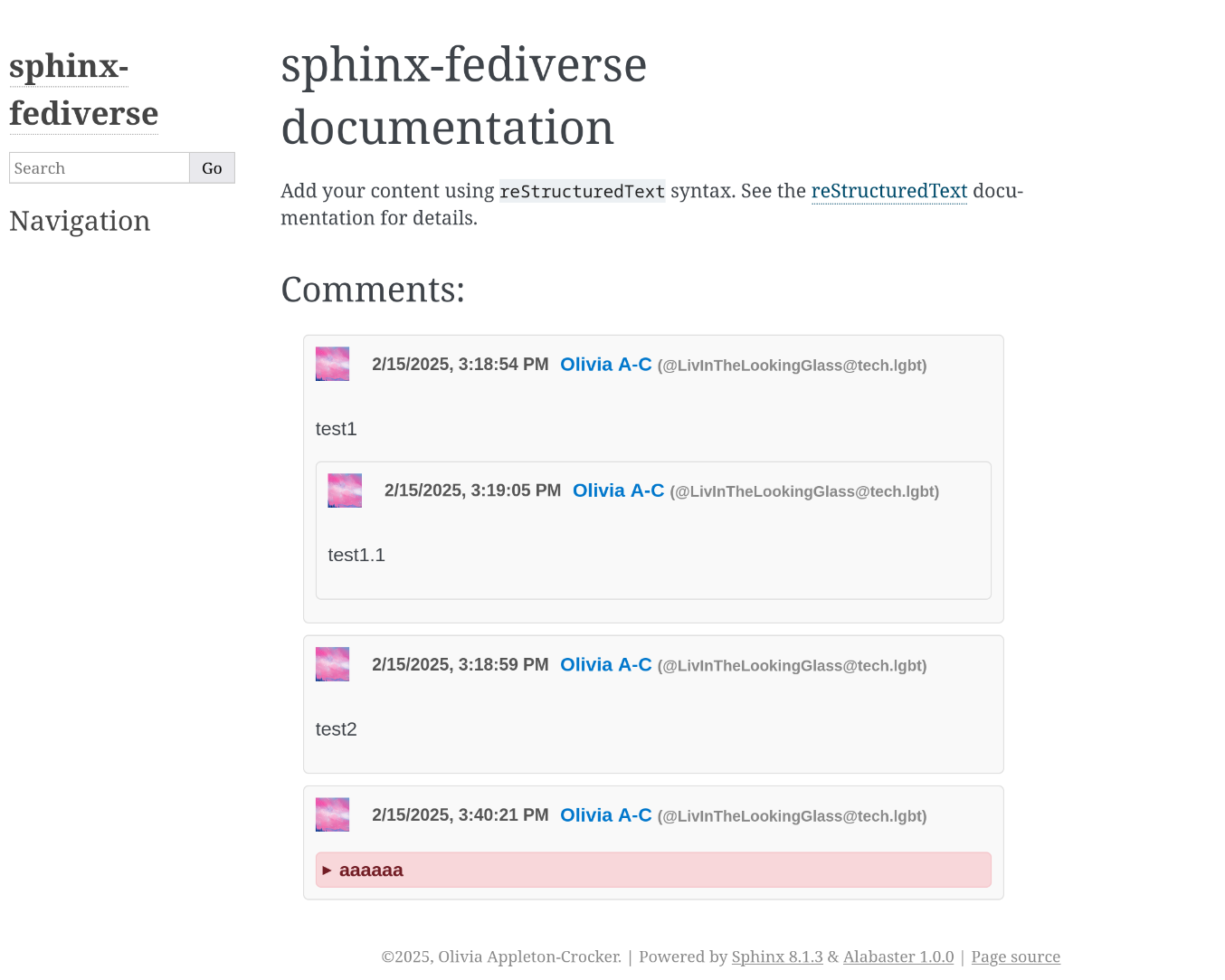
The first version of sphinx-fediverse shown in the Sphinx Alabaster theme. In it you can see a demonstration of several key features: threaded replies and content warnings
Now at this point it only supported Mastodon and its children. Sure, you could reply to it from other software types, but you couldn’t host it on them. More than that, a lot of the values were hardcoded. It only would work on tech.lgbt. And it had the comment ID hardcoded into the page.
There was a long way to go from here.
The Workflow
But let’s start with the basics: how does it work?
At Build Time
Once you’ve completed the setup and put the right command in your document, the following workflow is executed:
The plugin loads a JSON file containing all of the URL -> comment ID pairs
If it doesn’t find this URL in that mapping and sees the directive, it will create a post. At the time, this was entirely unformatted
It will then save that post to the mapping
In every page on your site, it will add a loader for
fedi_script.js,[1] which will be outlined laterIf it sees the directive, it will embed in your page:
The comment ID to look for
The Fedi instance you’re hosting on (in initial versions this was hard-coded)
Which flavor of Fedi instance you’re hosting on[2]
A short script to read the above and activate
fedi_script.js
This sets everything that the end-user needs into motion.
On Page Load
The workflow that gets executed in browser is a fair bit more complicated, especially these days. I am going to present the earliest working version of it here, and as we continue in the post I will talk about how it has changed. At the end of the post I will give a flow chart of the new workflow.
At the time, fedi_script.js contained exactly 6 functions. The entry point is called FetchComments(). Its job
is to find the first post and process all of its first-generation children. It renders them, then calls
FetchSubcomments() on each of them. At every point in this, there is a counter that ticks down. If it hits 0, the
page will stop looking for children. Although it is called maxDepth, that is a bit of a misnomer since a single
comment fetch will sometimes return many generations of children. FetchSubcomments() will recursively call itself
until that counter is exhausted.
There is another pair of methods: RenderCommentsBatch() and RenderComment(). These pretty much do what they say
on the tin. RenderCommentsBatch() will sort all of the replies its been handed, then send those off to
RenderComment() for processing. In turn, RenderComment() will put all of that information into a massive HTML
template and place it into the body of the page. It was later pointed out to me that this isn’t the most secure way to
go about it,[3] but sanitization is applied to enough fields that it was okay for the moment.
The most annoying part is probably replaceEmoji(), which requires you parse several bits of info and do all sorts
of string substitutions and CSS tuning. What’s worse is that different Fediverse flavors store it in completely
different and incompatible ways.
Lastly there is escapeHtml() which does a very basic input sanitization. This describes all the work up to 0.4.2,
which was the first published version.
![%%{init: {'theme': 'base', 'themeVariables': {'lineColor':'#baa7ff'}}}%%
graph
A["FetchComments()"] --> B["RenderCommentsBatch()"] & C["FetchSubcomments()"]
B --> D["RenderComment()"] --> E["escapeHtml()"] & F["replaceEmoji()"]
C --> B & C
F --> E](../_images/mermaid-4de60fa0ff357f4e85cdb28bba09865fce0ae61e.png)
Building Up
The next version saw my first attempts at Misskey support. Misskey is a bizarre creature. Its API is quite different, with the biggest problem for me being that it returns its own flavor of unsanitized markdown. Mastodon, at least in theory, returns sanitized HTML. This created all sorts of parsing problems. Another odd thing is that almost all of its API is implemented as HTTP POSTs, rather than the more common GET.
In the first versions that supported it, the goal was to make a messy prototype. So far, that’s pretty on-brand for this project.
There were some changes to names such as mastodon-comments becoming fedi-comments. Every function got a new parameter
fediFlavor to describe which was being processed. And a ton of branches had to be added to every part of the
browser-side code. There was a new Python dependency to make the initial posts, as well as different environment
variables needed to support the different authentication token scheme. To give an idea of how chaotic this was, I
present the render function as of 0.5.2. Just skimming it will give you a good impression of that.
 function RenderComment(fediFlavor, fediInstance, comment) {
    // TODO: better input sanitization
    if (document.getElementById(comment.id)) {
        return;
    }
    const user = fediFlavor === 'misskey' ? comment.user : comment.account;
    let domain;
    if (fediFlavor === 'misskey') {
        domain = user.host || fediInstance;
    } else {
        const match = user.url.match(/https?:\/\/([^\/]+)/);
        domain = match ? match[1] : null;
    }
    let handle;
    if (!domain) {
        console.error("Could not extract domain name from url: " + user.url);
        handle = `@${user.username}`;
    } else {
        handle = `@${user.username}@${domain}`;
    }
    const commentUrl = (fediFlavor === 'misskey'
        ? `https://${fediInstance}/notes/${comment.id}`
        : comment.url
    )
    const userUrl = (fediFlavor === 'misskey'
        ? `https://${fediInstance}/${handle}`
        : user.url
    )
    let str = `<div class="comment" id=${comment.id}>
        <div class="author">
            <div class="avatar">
                <img src="${user.avatar_static || user.avatarUrl}" height="30" width="30" alt="Avatar for ${user.display_name || user.name}">
            </div>
            <a target="_blank" class="date" href="${commentUrl}" rel="nofollow">
                ${new Date(comment.created_at || comment.createdAt).toLocaleString()}
            </a>
            <a target="_blank" href="${userUrl}" rel="nofollow">
                <span class="username">${replaceEmoji(escapeHtml(user.display_name || user.name), user.emojis || [])}</span> <span class="handle">(${handle})</span>
            </a>
        </div>`;
    if (comment.sensitive) {
        str += `<details><summary>${comment.spoiler_text || comment.cw || ""}</summary>`;
    }
    str += `
        <div class="content">
            <div class="fedi-comment-content">${comment.content || comment.text}</div>`;
    for (let attachment of (comment.media_attachments || comment.files)) {
        if (attachment.type === 'image') {
            str += `<img src="${attachment.remote_url || attachment.url}" alt="${attachment.description}" class="attachment"`;
        }
    }
    str += `
        </div>
        ${(comment.sensitive || comment.cw) ? "</details>" : ""}
        <div class="info"><img src="_static/like.svg" alt="Likes">${comment.favourites_count || comment.reactionCount}, <img src="_static/boost.svg" alt="Boosts">${comment.reblogs_count || comment.renoteCount}</div>
        <br>
    </div>`;
    const doc = parser.parseFromString(replaceEmoji(str, comment.emojis || []), 'text/html');
    const fragment = document.createDocumentFragment();
    Array.from(doc.body.childNodes).forEach(node => fragment.appendChild(node));
    return fragment;
}
It’s rather terrible. There are conditionals all over the place. More than that, it turned out I was using an insecure API to render. Only the most trivial attempts at sanitization were happening at all, and in nowhere near enough places.
Fortunately, changes were coming.
A Better Comment Parser
The next versions were all focused on building up a comment parser to try and reduce the complexity of rendering. Each
Fedi implementation got its own extractComment() variation, and there was a common return spec between the two to
ensure consistency. Roughly:
{
  "id": "string",
  "url": "url",
  "date": "string",
  "cw": "null | string",
  "emoji": {
    "name1": "url",
    "name2": "url",
    "...": "..."
  },
  "reactionCount": "int",
  "boostCount": "int",
  "media": [{
    "url": "url",
    "description": "string"
  }],
  "content": "string",
  "user": {
    "host": "string",
    "handle": "string",
    "url": "url",
    "name": "string",
    "avatar": "url",
    "emoji": {
      "name1": "url",
      "name2": "url",
      "...": "..."
    }
  }
}
This would evolve over time, but it was a lot better than parsing this out in render code. That function we showed above was able to shrink from 62 lines down to 38. Now the workflow looked something like:
![%%{init: {'theme': 'base', 'themeVariables': {'lineColor':'#baa7ff'}}}%%
graph
A["FetchComments()"] --> B["RenderCommentsBatch()"] & C["FetchSubcomments()"]
B --> D["RenderComment()"] --> G["ExtractComment()"] & E["escapeHtml()"] & F["replaceEmoji()"]
C --> B & C
F --> E
G -.-> H["ExtractMastodonComment()"] & I["ExtractMisskeyComment()"]
F --> E](../_images/mermaid-74c14f044565c16602abfd06d25ad11531037097.png)
The next several versions were focused entirely on bug fixes, stabilizing this new API, and fixing CSS problems.
Increasing Misskey Compatibility
Parsing Misskey Flavored Markdown
The part of Misskey support that I find most frustrating is their markdown syntax. They essentially support a subset of standard Markdown, but with a few additions:
hashtags (ex: #OpenStreetMap)
mentions (ex: @LivInTheLookingGlass, @tao@mathstodon.xyz)
custom emoji (syntax:
:blobhaj:-> )
)<small>(which shrinks text)<plain>(which escapes all formatting without wrapping in a code block)<center>(which centers text)<i>(a deprecated HTML tag that is an alias for Markdown’s*text*)flip (which is a shortcut for CSS transforms)
blur (CSS)
borders (CSS)
foreground and background colors (CSS)
expand (CSS)
position shifts (CSS)
rotations (CSS)
yomigana, which adds pronunciation characters above Japanese kanji
search (shows web search results)
several different animations
These are ordered in roughly the order that I am prioritizing them. The first 9 items are currently implemented, and I have plans to at least attempt an implementation of the remaining CSS elements. The last 3 are likely beyond the scope of this project.
Given that Misskey Flavored Markdown is notoriously difficult to parse, this project only aims to support a subset of it. And the easiest way by far to achieve that was to bring in a new dependency, marked.js. This allows me to set up a nice pipeline of string substitutions:
Original string
Escape the contents of
<plain>Replace
<center>Replace
<i>Replace
<small>Replace
flipReplace
blurReplace hashtags
Replace mentions
Replace the link format that removes previews
Feed to
marked.jsRaw HTML
![%%{init: {'theme': 'base', 'themeVariables': {'lineColor':'#baa7ff'}}}%%
graph
A["FetchComments()"] --> B["RenderCommentsBatch()"] & C["FetchSubcomments()"]
B --> D["RenderComment()"] --> G["ExtractComment()"] & E["escapeHtml()"] & F["replaceEmoji()"]
C --> B & C
F --> E
G -.-> H["ExtractMastodonComment()"] & I["ExtractMisskeyComment()"]
I --> E & J["marked.parse()"]
F --> E](../_images/mermaid-b65f916811615479687254c95b36769c23f8425d.png)
Supporting Custom Reactions
The other big difference between Misskey and (most implementations of) Mastodon is support for emoji-based reactions. On Mastodon, you have two possible interactions: favorite and boost. Misskey expands this to not just the set of emoji found in unicode, but also any custom one implemented on your server. Since at this point I had not implemented support for Misskey emoji, this implementation was restricted to only the unicode ones. In general, if a reaction is unknown or generic, it is rendered as ❤. If it is a different reaction that is exactly one character,[4] that is preserved. Boosts were left untouched and rendered as before.
You can still see the previous favorite icon at the top of each comment section.
Other Misc Changes
In addition to what’s discussed above, this series of changes brought:
Changes to word wrap on handles
Adding the page title to discussion posts
Improving the Renderer
In the 0.7 release sets, the biggest change was switching from an HTML template to using the
DOM API. There is still one place where raw HTML is being used: replaceEmoji(),
but it is reasonably isolated and (in later versions) well-sanitized.
Under the DOM API, you programmatically create elements and append them to existing one. So a flow to make:
for (let attachment of comment.media) {
    str += `<img src="${attachment.url}" alt="${escapeHtml(attachment.description)}" class="attachment">`;
}
Might look like:
for (const attachment of comment.media) {
    const attachmentNode = document.createElement("img");
    attachmentNode.setAttribute("src", attachment.url);
    attachmentNode.setAttribute("alt", attachment.description);
    attachmentNode.classList.add("attachment");
    content.appendChild(attachmentNode);
}
On the one hand, this is a lot more complicated. But on the other, it means you don’t need to worry about escaping strings and it deals with a lot of possible content injection vectors for you. It actually made the resulting code significantly longer (43 lines -> 96 lines, +123%), but the benefit is that it’s much more legible.
Supporting Misskey Emoji
In versions 0.8.0 and 0.8.1, I began to add support for custom Misskey emoji. Their system significantly differns from that of Mastodon, in that it does not include the URLs in the comment data itself. We have to fetch it individually every single time.
So I needed a way to fetch this. In order to do that efficiently, I also neede to convert extractComment() into an
async function so that multiple of these requests can be run at once. In order to reduce network traffic, I also needed
to keep a cache of previously fetched URLs such that we don’t repeatedly grab that. In later versions I would also add
rate limit handling to each of these functions.
![%%{init: {'theme': 'base', 'themeVariables': {'lineColor':'#baa7ff'}}}%%
graph
A["FetchComments()"] --> B["RenderCommentsBatch()"] & C["FetchSubcomments()"]
B --> D["RenderComment()"] --> G["ExtractComment()"] & E["escapeHtml()"] & F["replaceEmoji()"]
C --> B & C
F --> E
G -.-> H["ExtractMastodonComment()"] & I["ExtractMisskeyComment()"]
I --> E & K["fetchMisskeyEmoji()"] & J["marked.parse()"]](../_images/mermaid-e616f9a24a31946354a51038193976cb7392c4a5.png)
Other Misc Changes
Support for Misskey’s account-wide content warnings
Fix Mastodon invisibility bug
Reactions show up outside content warnings
Sanitizing HTML
One of the last changes I’ve made is to include code to sanitize HTML. In general, this means that it will block
elements that can inject harmful content in your page. So if someone carefully crafted a Misskey comment that would
include a <script> tag, and they did so in a way that would evade my simplistic escapeHtml() code, they would
be able to execute arbitrary code. This isn’t a problem if it only exists on a demo site, but if it’s going to get a
stable release it absolutely needed to be addressed.
To do this, I include a build of DOMPurify. It is frankly inadvisable to write your own santiization code. You will get it wrong. So using a crowdsourced one is much safer. It will be better tested, it will be better examined, and the combination of those means it will be a lot more secure.
![%%{init: {'theme': 'base', 'themeVariables': {'lineColor':'#baa7ff'}}}%%
graph
A["FetchComments()"] --> B["RenderCommentsBatch()"] & C["FetchSubcomments()"]
B --> D["RenderComment()"] --> G["ExtractComment()"] & F["replaceEmoji()"] & L["DOMPurify.sanitize()"]
C --> B & C
G -.-> H["ExtractMastodonComment()"] & I["ExtractMisskeyComment()"]
I --> K["fetchMisskeyEmoji()"] & E["escapeHtml()"] & J["marked.parse()"]
F --> I](../_images/mermaid-a60ad84e40e86f85a529ef27cc96f5589df55bf0.png)
Modularizing the Browser Code
This is the most recent batch of changes, and in my opinion the coolest. I wanted to make it so that you only need to
include the minimum amount of code needed to interace with your comment host. So I spun off the Mastodon and Misskey
code into their own files. I made it so that marked.js was only loaded for Misskey. And I reworked the control flow
to keep the minimum amount in what I now thing of as the “glue script,” fedi_script.js. While doing this, I renamed
some functions to make it more in line with style guides.
The first step was to remove the interface method extractComment() and replace it with something loaded on a
per-implementation function. So fedi_script_mastodon.js has an implementation of extractComment(), and
fedi_script_misskey.js has a different one. This way we don’t need to have an intermediate funciton call, and we
don’t need to embed a fediFlavor parameter.
Next was to move the fetch*() methods into those implementations, which lets us further remove that fediFlavor
parameter, and eliminate a large number of conditionals. API implementations are now entirely isolated to their own
files. This reveals something interesting: it’s much easier to support Mastodon. The Misskey file is literally twice
as large. It has twice as many functions. It has about two thirds more lines.
This also triggered a reorganization of the files. The Python and Javascript sources are now in their own subdirectories. They each have their own tests now, as well, bringing code coverage up to 59% (84% for Python + 40% for JavaScript). This is a substantial increase in reliability.
![%%{init: {'theme': 'base', 'themeVariables': {'lineColor':'#baa7ff'}}}%%
flowchart LR
subgraph Misskey["Misskey"]
MiA["fetchMeta()"]
MiB["fetchSubcomments()"] --> MiC["extractComment()"]
MiC --> MiD["escapeHtml()"] & MiE["fetchMisskeyEmoji()"] & MiF["marked.parse()"]
end
subgraph Mastodon
MaA["fetchMeta()"]
MaB["fetchSubcomments()"] --> MaC["extractComment()"]
end
A["fetchComments()"] -.-> MiA & MiB & MaA & MaB
A --> B["renderCommentsBatch()"]
B --> C["renderComment()"] --> E["replaceEmoji()"] & D["DOMPurify.sanitize()"]
MiC & E --> D](../_images/mermaid-249dc71934e8dc8921f900190e027ac26ee70c68.png)
Future Work
Before a Stable Release
Increasing Configurability
At the moment, there are very few configuration options. It would be highly desirable to have more options,
especially on a per-instance level. It would be nice to be able to change the post template with more customization.
Even better would be to optionally translate the :tags: metadata field into a list of hashtags.
I am very open to suggestions on what options should be added. Please provide feedback if you have any thoughts suggestions.
Delaying Comment Loading
Another suggestion I have received is to delay the loading of comments until they come into view. This seems feasible using the Intersection Observer API with some fallback if that is not implemented (like in older versions of iOS). This means that you would have significantly lower overhead on initial page load, and if you never see the comments in the first place, you don’t need to load them.
This should, of course, be a feature that users can opt out of.
Improving Ease of Commenting
There are two reasonable approaches here, and I would (in the long term) like to implement both. In order of priority:
Add a form that will redirect you to your fedi instance
Add a form that will allow anonymous comment submission through a self-hosted PHP script, with a captcha or maptcha requirement.
Other Fedi Implementations
Plemora Support
Fortunately there is a Python wrapper for Akkoma, a flork of Plemora. This means the Python side will be easy to support. Akkoma also supports the Mastodon API (with some minor differences). Mainline Plemora seems to have an API somewhat similar to Misskey, so it seems to me that much of it could be abstracted to share code there.
Lemmy Support
Lemmy has a Python wrapper, but it’s a 0.0.2 release from 2 years ago. While I suspect that it’s stable enough for this purpose, that’s not great and could break at any moment if Lemmy’s API changes. Their comment API is fairly well documented and shouldn’t be that hard to deal with.
Friendica Support
Friendica is in a similar situation, and would need to use the exact same library above.
Hubzilla, Nextcloud Support
For these, I would almost certainly need to implement the Python API usage myself. Additionally, it is difficult to find reliable documentation for their API, meaning it would need to be a very trial-and-error process. I would rather not deal with that. If you have any resources that would be able to help here, it would be deeply appreciated.
Ghost, WordPress, Plume, WriteFreely, etc.
I am explicitly ruling out the idea of posting to full blogging platforms. It’s one thing to post to a link aggregator or microblogging service, but it feels somewhat pointless to make a post to something that could plausibly host your whole article.
Other Static Site Generators
Since most of this is implemented in JavaScript with easy and well-documented hooks, it seems to me that this could easily be ported to other static site generators.
MkDocs, Pelican, & Nikola
These generators have the advantage of being written in Python. That means that a lot of the existing code could easily be recycled to them, possibly even using the same package.
Eleventy & Metalsmith
These generators are written in server-side JavaScript. Given that I’ve already had to come up with ways to import the browser code for testing purposes, it would be easy to recycle that (presuming good plugin support).
Zola
This generator is written in Rust, which is a language I am slowly falling in love with. If it’s feasible, this seems like a plausible next target.
Footnotes
Citations
Brian “Beej” Hall. Mastodon comments. URL: https://beej.us/blog/data/mastodon-comments/.
knz. Mastodon comments. URL: https://knz.ai/posts/2024-08-05-mastodon-comments/.
Heart Soul Machine. Mastodon comments. URL: https://heartsoulmachine.com/blog/2025/01-12-mastodon-comments/.
Graham MacPhee. Mastodon blog comments. URL: https://grahammacphee.com/writing/mastodon-blog-comments.
Daniel Pecos. Mastodon as comment system for your static blog. URL: https://danielpecos.com/2022/12/25/mastodon-as-comment-system-for-your-static-blog/.
Andreas Scherbaum. Client-side comments with mastodon on a static hugo website. URL: https://andreas.scherbaum.la/post/2024-05-23_client-side-comments-with-mastodon-on-a-static-hugo-website/.
Carl Schwan. Adding comments to your static blog with mastodon. URL: https://carlschwan.eu/2020/12/29/adding-comments-to-your-static-blog-with-mastodon/.
Laura L. Scott. Mastodon comments for a hugo static site. URL: https://lauralisscott.com/blog/mastodon-comments-hugo-static-site/.
Winterstein. Static comments for a static website. URL: https://www.winterstein.biz/blog/static-comments-for-static-website/.
Cite As
Click here to expand the bibtex entry.
@online{appleton_blog_0005,
  title    = { Developing sphinx-fediverse },
  author   = { Olivia Appleton-Crocker },
  language = { English },
  version  = { 1.1 },
  date     = { 2025-03-24 },
  url      = { https://blog.oliviaappleton.com/posts/0004-sphinx-fediverse }
}
 ,
,
